
Trackpad & Magic Mouse
Tip-tap
Rest your fingers, then tap another one on the left or right. Combine with the app switcher for a fully gesture-driven app navigation.
Mactomator breathes new life into your Mac. More trackpad and Magic Mouse gestures, gaming performance fixes, multi-screen enhancements, and dozens of automations. All with a focus on performance.
Powerful automation, small footprint.
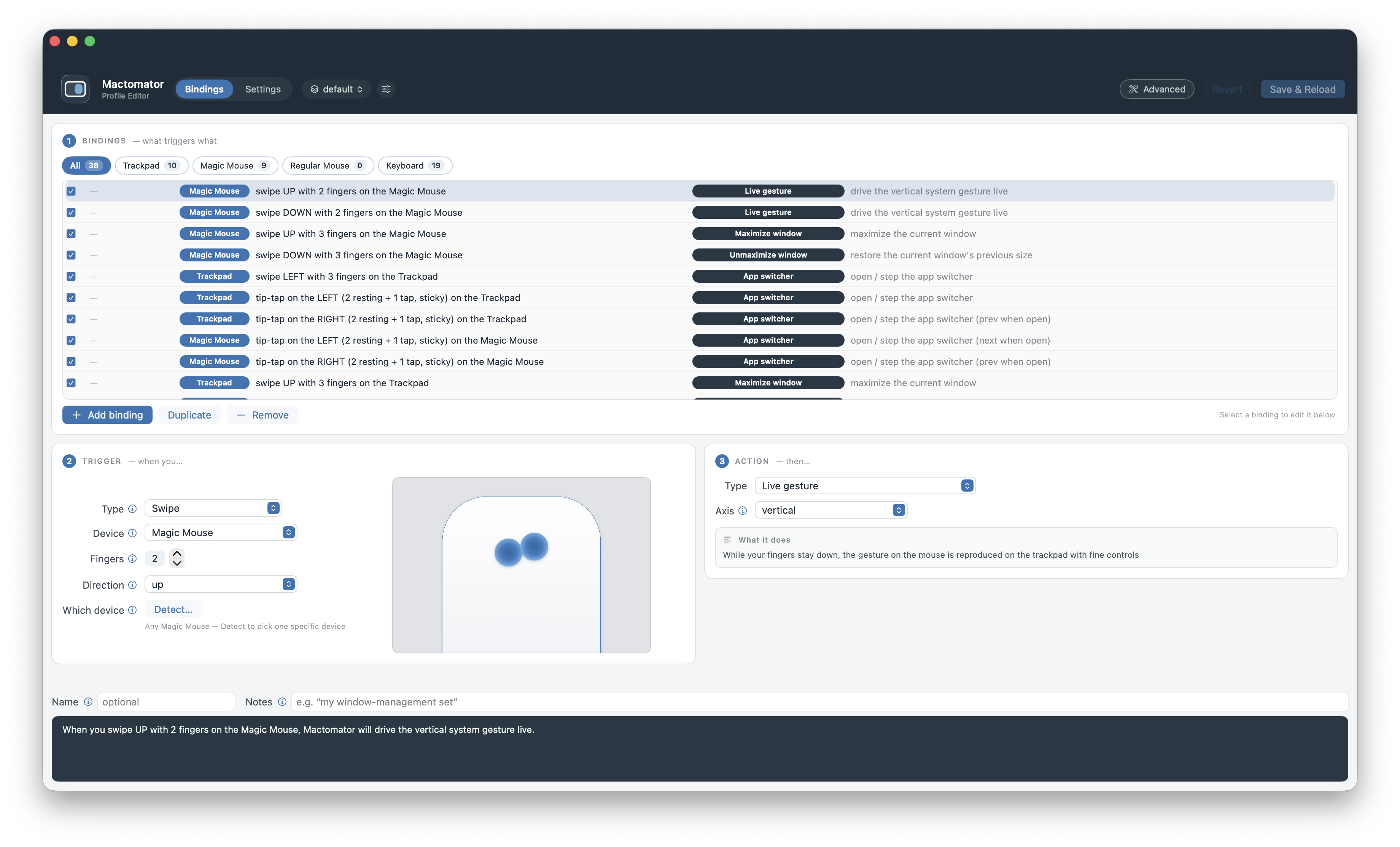
If you can think it, we can code it. Pick a trigger, and then an action. A subset of our (many) triggers and actions is shown below.
Rest your fingers, then tap another one on the left or right. Combine with the app switcher for a fully gesture-driven app navigation.
Go beyond what macOS provides and bind force click to whatever you want.
We let you do literally everything you do on a trackpad on a Magic Mouse. This includes precise pinch to zoom and Exposé. We support more fingers, too.
Tap any sequence of multiple keys, such as a quick double press, and fire any action you want, including simulating another key.
Make your mouse's back and forward buttons work in any app, even the ones that ignore them.
Hold a button and drag in a direction to run an action, or to swipe and pinch live.
Press mouse buttons and keys together, or one after another, in any mix.
Turn the wheel a notch up or down, or tilt it left or right, with or without modifiers held.
If you need a custom action, simply fire off a shell script or AppleScript.
Open the native app switcher (⌘-Tab) and step through apps from the trackpad or mouse. No keyboard needed!
Reach into menus of any app and trigger a command by its name. Perfect to automate prev/next actions in apps like Slack.
And plenty more: Media & volume Mission Control and App Exposé Dark mode Sleep & lock Move the pointer Per-app scoping Several actions per trigger Repeat while held Fine volume and brightness Show desktop Toggle full screen Switch Spaces Open apps, files and links Press any key or shortcut Hide and minimize apps Move windows between displays On-screen message when it triggers
If you use a high-frequency gaming mouse and more than one screen, you have surely seen WindowServer take up all your CPU and the system slow to a crawl. With Mactomator, this is no longer an issue.
Mactomator is the first app that lets you lower the polling rate of any mouse, significantly reducing the strain on WindowServer. What's more, it can disable this while you are in Game Mode, so gaming is never affected.
Swipe between Spaces and pinch to zoom live, from the Magic Mouse or any other mouse. You can also configure advanced, precise smooth scrolling for regular mice.
Perform pinch to zoom as you would on a trackpad. It works the same way, not in steps but in one continuous, controllable motion.
Hold a button and drag up (or in any direction you choose) to perform a real, live zoom gesture, just like a trackpad pinch.
Hold a button and drag sideways, and you can swipe between Spaces live (or do literally anything else).
Configure smooth scrolling, invert the scroll direction, and adjust mouse acceleration individually for each mouse.
With Mactomator, your cursor can now move between screens that aren't touching, jumping across the gap. And with DockGuard, your Dock never gets lost again.
When your screens don't line up, keep pushing the cursor toward the next screen and it moves across the gap. This also works while you drag windows and files.
Ever get annoyed when your Dock moves to another screen by accident? DockGuard fixes that permanently.
Regular macOS has one layout for the whole system. With Mactomator, you can completely customize the layout of individual keyboards.
We also let you do quick modifier swaps, so you can use Windows and gaming keyboards much more easily.
One of our many actions. You can snap a window to a fully customizable grid, maximize, recenter, move between screens, and much more.
Build your own grid, then drop any window straight into a zone.
Hold the key and step the window from cell to cell.
Fill the screen in one move, then restore it to the exact size and spot it had before.
Instantly move a window to the center of the screen.
Don't believe us? Here's how intuitive it is.
When you swipe up with three fingers, Mactomator will maximize the window.
Ordinary mice, per-device triggers, per-app behavior, profiles you can share and so much more.
It's not just for Apple hardware. Remap the buttons on any ordinary mouse or keyboard: the extra buttons, middle-click, or a modified single click.
Bind a specific device to any trigger. Two keyboards, or a trackpad and a mouse? The same key/gesture can do one thing on one device and something else (or nothing) on another.
The same trigger, tailored to each app. A Force click can flip Slack channels in one app and open Mission Control in another. Mactomator runs whichever action fits the app in front.
Group your triggers and actions under as many profiles as you like. Export them and share them easily with friends and coworkers.
Do it once. After that it runs in the background and stays out of your way.
Choose from a wide range: gestures, mouse buttons, key sequences, and more.
Window move, system control, and many others. And you can always invoke a script.
Limit the trigger to an app or peripheral. In the end, it's all saved in your shareable profile.
No account or card, just a download.
30 days, every feature.
Ready to keep it? Pick a plan.
A year of updates and support. Keep the app after it ends.
Renew any time to extend another year.
One purchase, every future update, forever.
Never think about updates again.